Wednesday, 11 June 2014
Does it pay to be an artist online?
Friday, 13 September 2013
Swindon Open Studios 2013 press article
Here is the online version of the article titled Town’s artists put on mass exhibition.
Monday, 26 March 2012
My painting on the cover of JMCP
Tuesday, 17 January 2012
From cards to labels
I just use two card punches I found in a craft shop. The first one (below) cut out the label.
I then use a second one to punch out the small whole for the thead.
Wednesday, 20 April 2011
The Proust Questionnaire
As an artist, it coud help you in various ways: find subjects you like, make your artist statement more personal, get ready for future interviews and even help you shape the business side of your art practice.
Marcel Proust was a French novelist best known for his series of novels “À la recherche du temps perdu” (In Search of Lost Time), published in seven parts between 1913 and 1927.
The Proust Questionnaire was made famous (and therefore get its name) to the responses given by Marcel Proust. He actually answered the questions several times during his life.
The questionnaire will be more useful if, after answering each question, you also ask yourself: “Why?” Be honest with yourself. You don’t have to share the answers with anyone if you don’t want to.
Here are the questions.
Your most marked characteristic?
The quality you most like in a man?
The quality you most like in a woman?
What do you most value in your friends?
What is your principle defect?
What is your favourite occupation?
What is your dream of happiness?
What to your mind would be the greatest of misfortunes?
What would you like to be?
In what country would you like to live?
What is your favourite colour?
What is your favourite flower?
What is your favourite bird?
Who are your favourite prose writers?
Who are your favourite poets?
Who is your favourite hero of fiction?
Who are your favourite heroines of fiction?
Who are your favourite composers?
Who are your favorite painters?
Who are your heroes in real life?
Who are your favourite heroines of history?
What are your favourite names?
What is it you most dislike?
What historical figures do you most despise?
What event in military history do you most admire?
What reform do you most admire?
What natural gift would you most like to possess?
How would you like to die?
What is your present state of mind?
To what faults do you feel most indulgent?
What is your motto?
Related articles and resources
It’s time to interview you.
Marcel Proust Proust questionnaire Artist Statement Art interview Art business Art marketing
Wednesday, 23 March 2011
How to describe your artwork - mnemonic
The trouble is that I can never remember the correct order when I need it (typically if I write an article for the blog or post a new painting on the website). So, I created a very simple mnemonic to help me to remember: How We Describe art.
Wednesday, 9 February 2011
Artist: Time to start a blog
When I started an art blog four years ago, I was not sure how long it would last and what it would bring to me. 350 articles later, I know it is worthwhile and I want to encourage you to start your own art blog, if you have not done so already.
Provided you have access to a computer, setting-up and running a blog is free. The two main blog platforms are Blogger and WordPress. With Blogger, you can choose a template and customise it and then use the editor to write blog posts. The editor is as simple to use as a text processing software, and you can insert photographs and hyperlinks at a touch of a button. You can then save drafts, publish your blog post immediately or schedule post publication for the date and time of your choice. You will be up and running in less than one hour.
What will you do with your blog? There are many ways to use a blog and a good way to find out is to visit other artists’ blogs and see what they have created.
At a basic level, a blog is an online journal. Tracking your progress by publishing your works on a blog has great value. As visual artist, painter or photograph, you can build a blog just by posting images of your work online. You can also get valuable comments from visitors to your blog and better understand what people like in your art.
It is better if you own a good digital camera (you are always keeping a photographic record of your work, are you?) However, if you have a mobile phone with a camera, you can start with it. A resolution of 72 DPI is sufficient to display graphics on the web.
Writing articles around your art and your technique will train you to better understand and communicate what you do. Post after post, you will tease out what constitutes the uniqueness of your art. There is an abundance of topics you can talk about: your art, technique and favourite subjects or art material. I also like to review art books, discuss art history and share art quotations. Overall, the blog motivates me to keep creating, reading and researching art techniques.
This is what I learnt by reading and writing blog posts:
- Post regularly: it could be once, twice or three times a week; but keep posting on a regular basis. Readers will abandon your blog if you publish only sporadically.
- Stay focussed: You need to find your voice and this will take time. Until you do, think about the topic you want to cover, write a description of what you plan to share with your blog and use this as a guide. Your art should be at the heart of your content. You can then broaden the conversation by talking about connected interests.
- Use pictures: You should have at least one picture in each blog post. This will make your content more attractive.
- Grab their attention with titles: The title and the first few lines of your article may be all that your reader will see in their RSS feeds reader. The title should intrigue, amuse or at least retain their attention. The first sentence is your hook and will keep them reading.
- Keep it short: readers on the internet surf from site to site. A short and well written article has more chance to grab your readers’ attention than a long and convoluted rambling.
- Make your content scannable: Readers want to know quickly if the content is relevant to them. You can use various techniques to improve an article readability: put keywords or important sentences in bold (don’t write sentences in all capitals, it would be like shouting); use lists and bullet points; and use short sentences and paragraphs.
Blog Artist blog Blogger WordPress
Monday, 6 December 2010
Another try at art exhibitions labels
I proceeded this way:
- Printed all labels using PowerPoint, each label being in a black frame (to make sure they are the same size)
- Cut the labels leaving a seam
- Glued the paper on a 2 mm foam board and
- Cut each label on the foam board with a sharp craft knife, using the black frame as a guide.
The overall result looked good. The labels were light and sturdy and easy to affix to the wall with whitetack . The foam being quite fragile, I had to transport the labels in a plastic sandwich box.
There is still room for improvement:
- I had to redo some of the labels because the paper was torn away while cutting the label. I found out that the different density of the material caused the issue. The trick was to have a first pass with the blade to cut the paper and then a second pass to cut through the foam.
- Some labels had a thin black line on some of their sides. I will have to be more careful to cut “inside the line”. Getting rid of the frame would solve the problem, but it would also make more difficult to cut all labels to the same measurement. I should try to print the frames in a very light grey. This way, even if the line appears, it should be almost invisible from afar.
Related articles
Labels Exhibition label Art exhibition Studio tip Studio hack
Monday, 29 November 2010
Jazzing up your leaflets presentation
Monday, 1 November 2010
FASO Database of Known Art Scammers
You can search by typing in an Email address, IP address or the person's name. If you are not sure how to find the IP address from an email, please check the article "How to find the IP address of the email sender in Gmail, Yahoo mail, Hotmail, AOL, Outlook Express, etc"
This is one resource to bookmark. And thank you Clint for making this resource available.
Thursday, 21 October 2010
My guest post on Fine Art Tips: 10 Tips to Bring Visitors to Your Art Fair Booth or Open Studio
10 Tips to Bring Visitors to Your Art Fair Booth or Open Studio. If you like it, let people know on Twitter, Facebook or by leaving a comment...
Friday, 15 October 2010
A facelift for my art website
![]() |
| Old design for my painting website |
Considering that I wrote my first website only with a basic text editor and wrote it in html and CSS, after buying a couple of books on the subject… it was not that bad. The drawback of this method was the time it took to create it and then to update it. Working this way is very repetitive and prone to mistakes. On the upside, learning to code html and CSS is valuable when I want to create something specific on my website.
The redesign was long overdue. I almost did it in April 2009 and then it fell through the cracks. I picked it up recently and did not let the project go this time.
![]() |
| New design for my painting website |
The new design
My brief was: create an uncluttered space that let my paintings speak for themselves.
I started with a blank piece of paper. It is tempting to buy a website editing software and just use one of the templates, but your website will look like hundreds of other websites out there. So, I followed the advice of experienced designers: paper and pencils is the best way to start. I just drew the elements on a blank page and tried different combinations until I found one I liked. While doing this, I reviewed many artists’ website, noting what I liked and what I did not like about them.
What is different on the new website?
- The white background does not compete with the paintings. You can’t get more simple that this.
- Many of the elements (titles, text and menu buttons) are grey, a neutral colour that again does not distract from the art.
- The colour scheme is minimal. I worked with three colours: A sandy colour for the side bar, a light camel colour for the links and grey.
- For the titles, I wanted a font that looked good and was legible. After trying many, I settled for Papyrus.
- In the portfolios, the gallery consists only of the images, without the titles, medium or dimension of the works. This looks much cleaner and all these details are available for each painting when you click on the image to see a larger version.
What I added to the website and you should get
After reading many articles on creating an artist website, I added a number of elements on the website.
- A Google search box on the homepage. I found the script using… Google.
- My photograph in the “Meet the artist” section.
- My contact details in the “Contact” section. I also added links to my contents on Twitter, Slideshare and YouTube
The best way to get a project like this done is:
- Work with checklists. For each page you create, there are a number of operations that you will have to carry out (write the title, list key works, etc.). Unless you use checklists, you WILL forget one step. What also happen is that you will think about one thing you must do or want to add on one page in the middle of creating another page. The best way to deal with this: just add it to your list to get it off your mind.
- Batch operations. For instance, to create JPG file in web friendly format for each work in Photoshop Element, it is easier to do all the vertical paintings in one go and then all the horizontal paintings.
- Take small steps until you are done. If I had 15 minutes available on a particular day, I could still create a single page and get closer to my goal.
Testing phase
Check, double check and check again. After I loaded the new website, I navigated it, clicking on all the links. Result? Missing images, broken links and wrong page titles. It does not matter how careful you are, you will miss some steps. Testing is essential. I am sure there are still some glitches I need to take care of.
The tools I used
I used a photo editing software. I have Photoshop Elements 6. It is a great piece of software worth the investment and if you want to buy it, the last version is Adobe Photoshop Elements 8 (PC DVD)
If you are on a budget, GIMP is a good alternative (see below).
To edit the page, I used an open source software called KomPozer (More on this software below). It made the whole process much easier.
Free resources for the creation of your artist website
- GIMP is a free alternative to Photoshop for photo editing and manipulation. I have not used it but read very positive reviews. If you want to learn more about this software, check out “GIMP Help: Tips, Advice, and Tutorials on How to Use GIMP”, a series of articles on EmptyEasel.com.
- Kompozer (available Windows, Mac, Linux) is a free WYSIWYG (What You See Is What You Get) editor for web pages and site management software. The program was easy to install and use.
- Filezilla (Windows, Linux, and Mac) is open source File Transfer Protocol (FTP) client. Kompozer has the capability to load your website onto the server, but this is a good alternative if you want a dedicated FTP software.
![]() |
| The dashboard of KomPozer |
Recommended books
Although I also wrote about software tools in this article, the most important part is the design itself. The following books were a great resource for educating me on design principles:
- DIY: Design it Yourself (Design Handbooks)
by Ellen Lupton. Read a review of this book.
- Hot-Wiring Your Creative Process: Strategies for Print and New Media Designers
by Curt Cloninger. Read a review of this book.
- Presentation Zen Design: Simple Design Principles and Techniques to Enhance Your Presentations (Voices That Matter)
by Garr Reynolds. You should also check his website Presentation Zen that contains great posts.
Art marketing Art website Artist website Website design Creating an art website Art website design Open source Free website editor Kompozer Filezilla Ellen Lupton Garr Reynolds Presentation Zen
Thursday, 14 October 2010
My French Easel on Twitter
Twitter let you change the background with your own picture, so I created five or six different ones and settled for the background below.
After that, I found out by chance that Blogger allows you to do the same and to customise your background, colour scheme, etc.
I also wanted to get some unity with my website www.benoitphilippe.com that I just redesigned (more on this soon).
If you are a reader of this blog and you are on Twitter, let me know in the comments section... I would love to follow you.
Monday, 27 September 2010
Californian Dream Exhibition Trailer
One of the things I had on my list was to make a trailer for the BBC Big Screen. If you want to know how I did it, read my earlier post on "How to take your art to the big screen".
I managed to complete the slideshow over the week-end and I have recreated it on YouTube so you can see it too.
If you cannot see the embedded video, please follow this link.
The music is by Scott McLean, from his album "Rock and Roll Karma". You can listen to this great album on Jamendo.
Sunday, 18 July 2010
What a difference a word makes

Friday, 22 January 2010
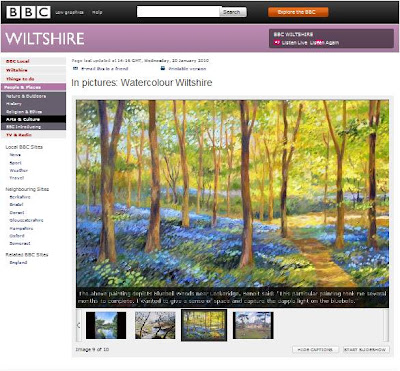
BBC Wiltshire gallery
The results looks really good. I let you judge by yourself by visiting the BBC website.
Wednesday, 16 September 2009
Swindon Open Studios experience
The question I was asked the most over the week-end was: “what is your favourite medium?” My answer is along the line that, when I see something interesting to paint, I feel immediately whether it would make a good oil painting, watercolour or pastel. I also go through cycles when I favour one medium over others. I also find interesting to treat the same subject in different media and see how they come to life in different ways.

When I wanted to take the discussion further with one of the visitors, I would ask: “Are you an artist?”
I was attentive to people’s reaction. Some visitors just wanted to look at the paintings, other were pleased to discuss and willing to learn more about my subjects, my inspirations and my technique. I tried to make myself available while not being all over the visitors (I try to learn for the best shop assistants I am coming across). One way to do that was to signal to them that I was the artist, which I did in different ways:
- I painted during both days of the event. If they see you painting, it makes the visitors interested and curious and also says clearly: “here is the artist”.
- I put on the wall my bio and artist statement with a photograph of myself, so that people reading it could identify me.
- I would tell people looking at the pictures: “Let me know if you have any question.”
The feedback I get was invaluable. My small pastels (that both sold) were frequently commented on. This reinforced my conviction that I should work more with pastels. Many people also liked how I paint the reflections in water.
I managed to give a copy of my newsletter "Notes From My French Easel" to a good number of people. I found that some visitors were reluctant to take it themselves, even if I had prepared a big sign that read “Free newsletter – Please take me home”.
I also met some wondeful artists who were sharing the same space at the Central Library.
Some points that worked very well and that I will use again:
- A long piece of cloth on the table: It looked good, professional and created a storage area under the table where I could hide all my bags, bubble wrap, etc., leaving the space uncluttered.
- A small easel on the table with a work: it made the table interesting and allowed me to showcase a particular work (which sold quickly).
- A plate of sweets: Enormous return on investment. Visitors felt welcome and it was an excellent way to bring families with children towards my paintings. The children went first and the parents followed. In addition, while the children ate their sweet, they let their parents watch the painting in peace.
- Painting on the day: The public really enjoys watching artists at work and you become the centre of attention in the room. I don’t mind talking while I paint or painting with people around. If there was a quieter moment during the day, time just flew as I painted.

I need to improve in a number of areas:
- Visitors’ book: I did not get any comment in my visitors’ book. The main reason for this is that I did not ask (I was focused on distributing my newsletter and it was difficult to push the visitors’ book at the same time). I am also wondering if it was also because people were afraid of the blank page. I had a look at other artists’ visitors book who received comments and they had the page prepared with a table and marked space for the information they wanted to collect (name, email address, comment). I need to try this next time.
- Sending out invitations ahead of time: because I was so busy with my work as part of the Open studios organising team, I neglected my own marketing. In particular, I sent my invitations late and did not reach everyone I should have.
- I should have brought with me a small notebook: I ended-up writing on scraps of papers, which is the best way to misplace your notes. With a notebook, I could have noted some comments on the fly and recorded actions and items that needed some follow-up.
Open studios Swindon open studios Art Marketing Art sale Art exhibition
Friday, 4 September 2009
It’s time to interview you (or the DIY interview)
You can read my interview on the Swindon Open Studios 2009 blog.
As part of the organising team, I put together a dedicated blog for the coming Swindon Open Studios 2009. We are more than 60 artists taking part over the week-end of 12th / 13th September.
I though that publishing interviews of participating artists would be a good way to promote the event as well as the artists. The public can learn more about each artist and participants to the event can also do the same. It was certainly very enjoyable for me to learn more about artists leaving in the area.
There are currently 17 interviews posted on the blog. As I am acting as the editor for the blog, I ended-up interviewing myself.
This is a very useful exercise. I did not come with the idea. I remember reading an article by Alyson Stanfield with this suggestion on Art Biz Blog (I could not find the article, but it is there). Here are some obvious benefits of doing this:
- It makes you think about you, your art and what makes it special. Therefore, it is a great way to get you started on your artist statement.
- You do not have to rush. You can write a draft and come back to it as many time as you want.
- It prepares you for future interviews with journalists, where you may have to answer questions on the spot. If a local radio calls you today, do you have something interesting to tell them?
I used the following interview questions, which are all relevant and general (apart from Question 10 that you can skip) to suit different art disciplines:
Q1 – Could you introduce yourself briefly to the readers?
Q2 - How did you become interested in art?
Q3 - What inspires you most as an artist?
Q4 - What is your favourite medium or media? Why?
Q5 - Could you tell us some more about your work?
Q6 - How would you define your style?
Q7 - What are your influences; artists from the past or present who inspire you?
Q8 - How do you choose the subjects of your works?
Q9- How do you prepare yourself for an exhibition or a show like the Open Studios?
Q10- You took part in the Swindon Open Studios in the past, what did it bring to you?
Q11 - Are there territories (media, subjects, etc.) you want to explore in the coming years?
Q12 - As an artist, what would be your dream?
Q13 - Could you share one thing that you have learnt in your own art practice that would be useful to other artists?
I would suggest that you try to answer these questions without reading the interviews published on the blog (OK, you can read mine if you want to…), so that you are not influenced by what you read.
Only after you have a draft of your own interview, go and read all or some of the 17 interviews published on the Swindon Open Studios 2009 blog. By asking the same questions to all artists, I have effectively built for you a reference library of answers. I am sure that reading how other artists have answered these questions will give you some new ideas to describe and explain your art.
If you want to take it further, you can start to collect interview questions in art magazines and newspapers and see how you would answer these.
Artist interview Art marketing Art Biz Blog Alyson Stanfield Swindon Open Studios 2009
Friday, 24 July 2009
Signing your works of art
Signing a work is like affixing your brand on it. The work becomes truly yours.
One function of the signature is to tell yourself (and others) that you judge that your work is finished. I occasionally rework paintings that have been signed, but this is the exception. To me, seeing the signature as “stop” sign is good practice. You could work again and again on a painting and try to make it perfect. At some point, it just makes it worst because the painting feels laboured. Knowing when to stop is part of the art and a difficult decision. Practically, I often wait a few weeks before signing a painting to make sure that the work is finished.
I see my signature has part of the composition. What I mean by this is that, when I am in the middle of a painting, I know where the signature will go and I treat the signature as one visual element to balance the composition. In term of size, the size of the signature should remain proportional to the scale of the work. In other word, your signature is not your work and a big signature will only detract the viewer from the actual painting.
You can sign your work in many ways:
- Horizontally or vertically
- Your full name or your initials
- At the front or at the back of the work
- Should be still visible when the work is framed (so remember to leave space for the mount or frame)
In any case, I believe a signature should be legible (so the work can be identified as yours) and somehow consistent. This is important in order to facilitate later identification of your works. In case you are using initials or a monogram, I strongly recommend that you write your full name at the back of your work.
Legibility requirement also mean that the signature should be on a quiet background, not across a busy pattern. Regarding contrast, I have tried using black as well as light colours (for dark background). Now, most of the time, I am using a light hue of red, which I found work well with most background colours in landscape and is noticeable without being too dark. This is a matter of personal taste.
Your signature may vary and evolve over several years, however you should try to be consistent and avoid signing in a different way each time. Your signature is part of your style.
Related articles
To sign or not to sign (your artwork) by Alyson Stanfield of ArtBizBlog
Saturday, 11 July 2009
Getting the best of an Open Studios
I am still helping with the organisation of the Swindon Open Studios 2009 and, as part of this, I have started a blog. I just posted there an article on Getting the best of an Open Studios. Check it out...