Showing posts with label Art website. Show all posts

Monday, 25 June 2012

Celebrating 500 posts

This post is number 500 on this blog! I never thought I would get that far when I started this My French Easel blog in August 2007. First, I am sending a big thank you to everyone who follows or visit this blog. This helps me carrying on.


Source: background photo from NASA

I had a several reasons to start this blog:
  • This motivates me to paint and create.
  • It acts like a journal and I can refer to when I want.
  • I like to share my painting tips.
  • As a non-native English speaker, writing regularly in English is a good exercise.
A few numbers

I try not to look at the blog's statistics too often, but numbers show some interesting and often surprising facts.

  • 199509 pageviews since the start
  • 207 followers
  • Post with the most page views (5,234 Pageviews): Texture in oil with painting knives
  • Most used search term that led to the blog: Hokusai
This blog is not a commercial venture. I decided not to put any advertising on the site and I don’t plan to change that. I use Amazon affiliate links (and managed to buy one art book with the proceeds...), but this does not dictate the content of the blog.

A few favourite posts

Let me do that by category.

Paintings: Cable car ride for oil paintings; Dragon Gate (San Francisco) for mixed-media; River Kennet at Avebury for watercolour and Children at the river for pastel.

Recommended book: It’s hard to pick one, but the most inspiring book I read and reviewed on the blog so far is The Creative habit by Twyla Tharp.

Museum: I can’t really pick a favourite museum, however the Marmottan museum in Paris is a must see if you like Impresionnism.

Painting studio tips: two posts my readers found useful are How to open a stuck oil paint tube and How to set-up your French easel (on your own).

Art material: my vote goes to the daylight easel lamp because I can paint in the evening with it, without fear of discovering the next day that all the colours are wrong.


Monday, 11 July 2011

Your Paintings - Oil paintings in UK museums

Your Paintings is a website which aims to show the entire UK national collection of oil paintings. It is driven by the BBC in association with Public Catalogue Foundation (a charity that catalogues works in museums in the UK) and many museums and art galleries across the country.


At the moment, they have 63,000 works online with a goal of putting 200,000 paintings on the website.

It is possible to search by Artists and by Galleries & Collections.

Another interesting feature of the project is that all visitors can help improving the search capabilities on the site by tagging pictures.


Visit Your Paintings website.


Technorati Tags :

Friday, 25 February 2011

My blog post template


As some of you have a blog, I though I would share with you the method I am using to write my posts. One of the central tools that saves me a lot of time is a simple Word document template.


The idea is simple: I want to eliminate as far as possible the repetitive actions and have under my fingers all the possible elements I need from the first draft to the final product (in particular links to websites I use).

Here is my template (it has evolved over time and I keep playing with it):

TO DO
  • First draft
  • Insert headers (newsletter / Frequency)
  • List related articles with links
  • Create Amazon affiliate links
  • Edit / revise
  • Get photograph
  • Format photograph for web use

Title

Related articles and resources


Amazon Affiliate Programs


Product Links
- Link directly to a specific product on Amazon using the product image
or text.

Headers

This article was first published in "Frequency Magazine" [http://www.frequencymagazine.co.uk/] – [month] 2011.

This article was first published in my newsletter "Notes From My French Easel" – [month] 2011. Follow the link to receive this free monthly newsletter. [http://homepage.xyz.html]

[End of template]

Related articles and resources


Wednesday, 9 February 2011

Artist: Time to start a blog

This article was first published in "Frequency Magazine" – February 2011.


When I started an art blog four years ago, I was not sure how long it would last and what it would bring to me. 350 articles later, I know it is worthwhile and I want to encourage you to start your own art blog, if you have not done so already.

Provided you have access to a computer, setting-up and running a blog is free. The two main blog platforms are Blogger and WordPress. With Blogger, you can choose a template and customise it and then use the editor to write blog posts. The editor is as simple to use as a text processing software, and you can insert photographs and hyperlinks at a touch of a button. You can then save drafts, publish your blog post immediately or schedule post publication for the date and time of your choice. You will be up and running in less than one hour.


What will you do with your blog? There are many ways to use a blog and a good way to find out is to visit other artists’ blogs and see what they have created.

At a basic level, a blog is an online journal. Tracking your progress by publishing your works on a blog has great value. As visual artist, painter or photograph, you can build a blog just by posting images of your work online. You can also get valuable comments from visitors to your blog and better understand what people like in your art.

It is better if you own a good digital camera (you are always keeping a photographic record of your work, are you?) However, if you have a mobile phone with a camera, you can start with it. A resolution of 72 DPI is sufficient to display graphics on the web.

Writing articles around your art and your technique will train you to better understand and communicate what you do. Post after post, you will tease out what constitutes the uniqueness of your art. There is an abundance of topics you can talk about: your art, technique and favourite subjects or art material. I also like to review art books, discuss art history and share art quotations. Overall, the blog motivates me to keep creating, reading and researching art techniques.

This is what I learnt by reading and writing blog posts:

  • Post regularly: it could be once, twice or three times a week; but keep posting on a regular basis. Readers will abandon your blog if you publish only sporadically.

  • Stay focussed: You need to find your voice and this will take time. Until you do, think about the topic you want to cover, write a description of what you plan to share with your blog and use this as a guide. Your art should be at the heart of your content. You can then broaden the conversation by talking about connected interests.

  • Use pictures: You should have at least one picture in each blog post. This will make your content more attractive.

  • Grab their attention with titles: The title and the first few lines of your article may be all that your reader will see in their RSS feeds reader. The title should intrigue, amuse or at least retain their attention. The first sentence is your hook and will keep them reading.

  • Keep it short: readers on the internet surf from site to site. A short and well written article has more chance to grab your readers’ attention than a long and convoluted rambling.

  • Make your content scannable: Readers want to know quickly if the content is relevant to them. You can use various techniques to improve an article readability: put keywords or important sentences in bold (don’t write sentences in all capitals, it would be like shouting); use lists and bullet points; and use short sentences and paragraphs.
It takes time to build readership, so be patient and grow your audience post after post. See you on the web!


Monday, 1 November 2010

FASO Database of Known Art Scammers

From time to time, you can read a story of art scammers abusing the confidence of artists. Fine Art Studio Online (FASO) by Clint Watson (@clintavo on Twitter) put together a database of Known Art Scammers that you can consult for free.

You can search by typing in an Email address, IP address or the person's name. If you are not sure how to find the IP address from an email, please check the article "How to find the IP address of the email sender in Gmail, Yahoo mail, Hotmail, AOL, Outlook Express, etc"


This is one resource to bookmark. And thank you Clint for making this resource available.

Thursday, 28 October 2010

An artist’s use of online colour palette generators

There are a number of colour palette generators available online. Just type “colour palette generator” and then “color palette generator” in Google and you will find a comprehensive list.


The most useful generators are the ones where you upload a photograph (or indicate the URL of a photograph) and the online tool generates a palette from the image. I selected the Color Palette Generator on the CSS Drive website for this article.

The first use of the tool, if you are a painter, is to generate a palette from your reference photograph. This gives you a good indication of the colours and hues you could use for the painting. This is interesting because the palette generated may be different from your usual palette. This way, you can grow your colour vocabulary.


A second use of the online palette generator is to create a palette based on the final painting. If you do that with several of your paintings, it may show you your colour bias.

Relaxing at Mevagissey - Oil on canvas by Benoit Philippe


You get even more interesting information when you compare the palette obtained with the final painting with the palette generated by the tool from your reference photograph.


Friday, 15 October 2010

A facelift for my art website

Each time I went to my art website http://www.benoitphilippe.com/ , I knew I had to redesign it. The colour scheme and design looked outdated and amateurish. In a nutshell, there was good content there, but not very well packaged.
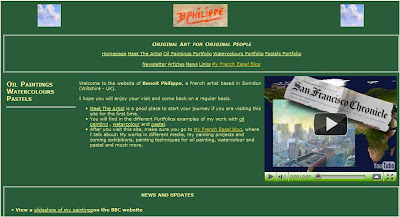
Old design for my painting website


Considering that I wrote my first website only with a basic text editor and wrote it in html and CSS, after buying a couple of books on the subject… it was not that bad. The drawback of this method was the time it took to create it and then to update it. Working this way is very repetitive and prone to mistakes. On the upside, learning to code html and CSS is valuable when I want to create something specific on my website.

The redesign was long overdue. I almost did it in April 2009 and then it fell through the cracks. I picked it up recently and did not let the project go this time.
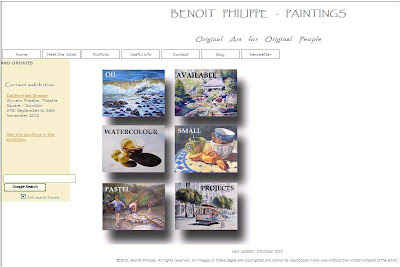
New design for my painting website

The new design

My brief was: create an uncluttered space that let my paintings speak for themselves.
I started with a blank piece of paper. It is tempting to buy a website editing software and just use one of the templates, but your website will look like hundreds of other websites out there. So, I followed the advice of experienced designers: paper and pencils is the best way to start. I just drew the elements on a blank page and tried different combinations until I found one I liked. While doing this, I reviewed many artists’ website, noting what I liked and what I did not like about them.


What is different on the new website?
  • The white background does not compete with the paintings. You can’t get more simple that this.
  • Many of the elements (titles, text and menu buttons) are grey, a neutral colour that again does not distract from the art.
  • The colour scheme is minimal. I worked with three colours: A sandy colour for the side bar, a light camel colour for the links and grey.
  • For the titles, I wanted a font that looked good and was legible. After trying many, I settled for Papyrus.
  • In the portfolios, the gallery consists only of the images, without the titles, medium or dimension of the works. This looks much cleaner and all these details are available for each painting when you click on the image to see a larger version.
I strived to have a consistent layout throughout the website. I also tried to make the navigation as straightforward as possible (I hope I succeeded).


What I added to the website and you should get

After reading many articles on creating an artist website, I added a number of elements on the website.
  1. A Google search box on the homepage. I found the script using… Google.
  2. My photograph in the “Meet the artist” section.
  3. My contact details in the “Contact” section. I also added links to my contents on Twitter, Slideshare and YouTube
The process


The best way to get a project like this done is:

  • Work with checklists. For each page you create, there are a number of operations that you will have to carry out (write the title, list key works, etc.). Unless you use checklists, you WILL forget one step. What also happen is that you will think about one thing you must do or want to add on one page in the middle of creating another page. The best way to deal with this: just add it to your list to get it off your mind.
  • Batch operations. For instance, to create JPG file in web friendly format for each work in Photoshop Element, it is easier to do all the vertical paintings in one go and then all the horizontal paintings.

  • Take small steps until you are done. If I had 15 minutes available on a particular day, I could still create a single page and get closer to my goal.

Testing phase

Check, double check and check again. After I loaded the new website, I navigated it, clicking on all the links. Result? Missing images, broken links and wrong page titles. It does not matter how careful you are, you will miss some steps. Testing is essential. I am sure there are still some glitches I need to take care of.


The tools I used
I used a photo editing software. I have Photoshop Elements 6. It is a great piece of software worth the investment and if you want to buy it, the last version is Adobe Photoshop Elements 8 (PC DVD).

If you are on a budget, GIMP is a good alternative (see below).

To edit the page, I used an open source software called KomPozer (More on this software below). It made the whole process much easier.
Free resources for the creation of your artist website

  • GIMP is a free alternative to Photoshop for photo editing and manipulation. I have not used it but read very positive reviews. If you want to learn more about this software, check out “GIMP Help: Tips, Advice, and Tutorials on How to Use GIMP”, a series of articles on EmptyEasel.com.
  • Kompozer (available Windows, Mac, Linux) is a free WYSIWYG (What You See Is What You Get) editor for web pages and site management software. The program was easy to install and use.
  • Filezilla (Windows, Linux, and Mac) is open source File Transfer Protocol (FTP) client. Kompozer has the capability to load your website onto the server, but this is a good alternative if you want a dedicated FTP software.
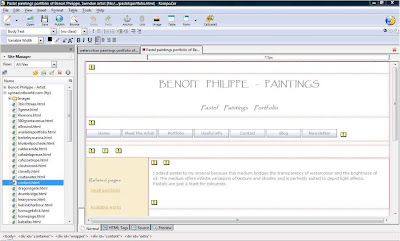
The dashboard of KomPozer

Recommended books

Although I also wrote about software tools in this article, the most important part is the design itself. The following books were a great resource for educating me on design principles:


Friday, 22 January 2010

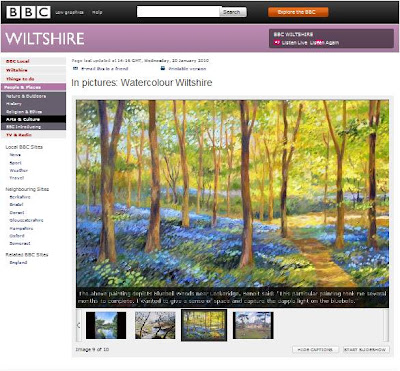
BBC Wiltshire gallery

Last weeks, the BBC contacted me because they were redoing their website and asked me if they could make a gallery with my paintings of local landscapes... an offer you cannot refuse.


The results looks really good. I let you judge by yourself by visiting the BBC website.


Wednesday, 18 March 2009

Would you swap Paris for Swindon?


BBC Wiltshire published on their website an article on my paintings of Swindon, under the title Would you swap Paris for Swindon?. The journalist heard me on the radio when I came for an interview last Monday and contacted me to get some photographs of my paintings.


The Evening Advertiser, Swindon's local newspaper, also ran a small piece on my paintings slide show being on the Big Screen.


Monday, 29 December 2008

Educational resource on modern art from the Centre Pompidou

As I was carrying out some research on a piece of modern art, I stumbled upon a site from the Centre Pompidou in Paris (home of the National Museum of Modern Art) with some interesting material on modern artists and modern art movements.


These educational art files have been put together to help art amateurs prepare for their visit. They contain reproductions of works by artists in the collection as well as some biographical and historical information. These files are worth reading and provide a good introduction to key modern artists.

Here is the list of 13 files available in English (they are also available in French):


Add to Technorati Favorites

Monday, 8 December 2008

10 Reasons to keep an inventory of your art works (Part 2)

In 10 Reasons to keep an inventory of your art works (Part 1), I discussed why you should keep an inventory of your works. Let’s see now what information can be recorded.


What information goes into your inventory?

How much information you put in your inventory is up to you. My rule of thumb is: the more, the better.

  • A reference number: not mandatory, but may be convenient if, for instance, you what to link the entry to a separate library of photographs of your
  • Title of the work

  • Dimensions of the work. I may indicate the dimensions in inches or centimetres or both (it depends whether I buy the support in France or in England).


  • Date of completion. Personally, I use the month and the year and, if the work has been created over a long period of time, I would register it at the end with the indication of both the starting month and the end month.


  • Medium: watercolour, oil painting, graphite, etc.


  • Support: canvas, board, watercolour paper… Personally, I indicate the details of the support used in the comment section. This is important as, if I like the effect I can achieve with a particular paper, I want to know exactly what sort and brand it is. Same thing for a canvas I am using for oil painting. A typical example would be: “Winsor & Newton Artists’ Quality Stretched Cotton Canvas – Triple coated Acid free sizing” (I make sure I keep the label of the canvas until I transfer the information into the inventory)


  • Material used. This is important in particular if you use unusual material or techniques. But even if you use traditional technique, some information may be useful if the work needs restoration of repair (for instance the type of varnish you use on your oil painting)


  • Price (if the work is for sale): I indicate is the price is for the work with or without the frame.


  • Costs information: I try to track the cost of material, such as canvasses and frames. This helps when you set-up the price of your work.


  • Information on the subject of the painting. Are you going to remember the exact name of that place you painted five years ago if it is not in the title of the work?


  • Details on the creation of the work: If I write a blog entry on a particular work, I would cut & paste the text in the “comments” section.


  • Exhibitions where the work has been show.


  • Juried exhibition where the work has been submitted (even if it has been refused)


  • Publication record. Has the work been featured in the press or in a book?


  • SOLD”… with the date when it has been sold.


  • Name of the collector who purchased the work, as well as her or his details


Tools for your inventory

If you are low-tech, pen and paper work well. Just prepare a table with as many columns as necessary for the information you want to capture and photocopy your template.

On a computer, you can use a simple spreadsheet (like Microsoft Excel) or a table in a Word document (use the landscape format) to keep your inventory. The key is to keep your inventory up-to-date as you go. I learnt the hard way that trying the re-create the information several years after the facts is almost impossible.

You can also invest in a professional solution. A number of vendors propose some software that helps you to keep your inventory, but also to generate price lists, catalogues and even manage your mailing list. See Related articles below for more information on existing artist software solutions.


Some practical considerations


If you keep your inventory on your computer:


  • Print it from time to time, just in case

  • Always back-up you information (on a disk or on another computer, of both)


  • Print a couple of blank tables where you can write down the information when you have it. At the end of the month, you can transcribe your notes into your electronic document. Batching in this way will save you time and you won’t have to switch your computer on to update one piece of information in your inventory.


Related articles

Updated database software for artists by Alyson Stanfield from Art Biz Blog

Template for inventory record


Thursday, 20 November 2008

Happy Thanksgiving!


We don’t really celebrate Thanksgiving in Europe, but I know many of you are visiting this blog from the US, so I wanted to wish you all a Happy Thanksgiving.

As explained in Wikipedia, Thanksgiving is “an annual American Federal holiday to express thanks for one's material and spiritual possessions.” I am grateful for what I have: a lovely wife, a great family, good health, an interesting job, and time to paint.


I would like to take this occasion to thank the following artists that have a link from their blog to mine:

Susan lives with her family in California and paint with watercolours and draw with pencils and colour pencils. You can see her works on her blog Susan’s Scribbles . Susan is also behind A Day in the Arts website , which motto is “Making Art accessible to all”

Purnima Palkar, an artist living in Switzerland, features some beautiful handcrafted products and paintings on her blog Chitra Karma
. The designs are elegant and the bright colours will cheer you up. Check out Purnima art and craft for sale at Peazcreation on Etsy.

Carol Monosson, an artist from Israel behind two blogs: Carol - MyWork with some nice drawings and really interesting digital photos (I like the one with the fishes and the toirtoise) and Carol - connecting that she uses to stay in touch.


(Long) Post Scriptum

You may wonder how I found about this. I know thanks to a tip that Dan, who is managing EmptyEasel, gave in his article “An Off-site SEO Tip for Online Artists (Or, The Good Karma of Linking)”.


Yahoo has a tool called Site Explorer , which allows you to know who is linking to your site. It is simple:


  • Go to Site Explorer,
  • Enter the URL of your website at the top of the page and hit the “Explore URL” Button.
  • Click on the “Inlinks” button to see the list of web pages linking to your site

  • The links shown in the list are clickable and you can explore the pages


Add to Technorati Favorites


Monday, 4 August 2008

My Blog Tools


The magic of blogging is that most tools come free but nevertheless offer great features. If you think about starting a blog, I am sharing with you what is in my blogger’s toolbox.


  • A moleskin notebook: it offers a flexible way to gather idea for articles, quotes and other material. Sometime, I write the first draft in my notebook, some other times, I just do a mind map or I list all the ideas that come to mind around the subject I am writing on.

  • Microsoft Word: The reason I type first in Word is the possibility to save the draft and come back to it to add to it and move sentences and paragraphs around. I can also use the program to check spelling and grammar. I have created a template for blog entries with the different scripts I am using (like Technorati and Digg) and the link to resources I frequently use when writing (like Amazon).

  • Blogger: A very easy to use blogging platform with excellent functionalities. The last one that really adds value is the possibility to write posts in advance and schedule their publication. No more excuse, even if you go away.

  • A digital camera (or the camera on my mobile phone): I take photographs of my paintings, but also photographs for illustration purpose. My rule of thumb is to have at least one photograph per post.

  • A photo editing software: Until now, I have used a program called Arcsoft PhotoStudio 2.0 that offers good basic functions. I just purchased Abode Photoshop Elements 6 (PC) and I am impatient to explore its possibilities.

  • ResizR : a website to resize your photographs online.

  • Blake’s Technorati link generator. You type the list of keywords for your article and the site creates the Technocrati html code for you.

  • Feedburner: This free service let your readers subscribe to your blog with the option to receive your articles by email or by using an RSS reader.

  • Google Analytics allows you see how many readers you have, where they come from, how long they stay on the site, etc. The data presented is impressive and you just need to be careful not to check your statistics every hour.


Related resources


  • If you have questions and want to learn more about blogging, the best resource I have found is ProBlogger.


Add to Technorati Favorites


Friday, 13 June 2008

100 posts later: why blogging as an artist?

I just realised I passed the 100 posts mark. Achievements call for celebration and I also think it is a good time to look back and reflect on what I learned since I started the blog.

So,
why blogging as an artist?


  • Sharing your art: The first advantage of a blog is the possibility to share your art with many people. Some excellent artists’ blogs just do that very well, like Urban Painter William Wray, Ed Terpening with his blog Life Plein Air or Rob Ijbema with his Painting Wales Diary.


  • Reaching out and making contact: I am still amazed by the visits I receive from so many different countries. Writing a blog is a good way to get out of your sandbox and see with your own eyes that, as Thomas Friedman put it, "The World is flat" (The World Is Flat: The Globalized World in the Twenty-first Century )


  • Getting feedback: People can post comments on your blog. You can also asked questions while you built an audience. A blog is an easy way to start the dialogue.


  • Making you accountable: A common advice when it comes to achieving your goal is to share them (for a good article on goal setting, see: Goal-Setting: The 90-Day Challenge by Michael Hyatt). You can do that with your blog and you can also report on progress your making towards these goals.


  • An artistic diary: I am using the blog as a diary of what I paint and what I am reading. If I share good websites or articles with my reader on the blog, I also get an easy way for me to retrieve them later. On a more down to earth side, if I failed to update my paintings inventory for some time, I can use the blog to track the paintings I need to enter into my records.


  • Expanding and testing out your thoughts: The journaling function of a blog is important. A blog is a good place to launch ideas, let them mature and come back to them later to refine your vision. You can write a series of short post entries and then use them to build a larger article for your website. If you take this to the extreme, writing blog articles is a great way to write a book one building block at a time.


  • Seeing what you accomplished: Looking back and seeing what I have done is key to keeping my motivation up. I just need to look at the menu and the many entries on the blog to know that, every single week, I have done something to move my art forward.


Add to Technorati Favorites


Friday, 11 January 2008

A Big Thank You To Empty Easel Blog


Empty Easel blog just reviewed my work. It is very exciting to read someone else's comments on your paintings.

The article is titled:
Benoit Philippe:Impressionist Watercolor Paintings from the United Kingdom.


The first interesting point is the choice of works from my watercolour portfolio. The three selected paintings would have made my selection too. Here are few comments that I particularly liked:

"Each of Philippe’s watercolor pieces reflect his French Impressionist style—you can see it in the loosely painted foliage and the multi-colored water—and yet there’s some great detail work in many of his paintings too."

and:

"Philippe has the natural eye of an Impressionist, finding beauty in the ordinary things of life and nature, like this sunset behind a row of trees."

I am convinced that you can find "beauty in the ordinary things of life", which I consider one of the privileges of artists. I already discussed this in The Art Of Ordinary.

While you visit the Empty Easel Blog, make sure you go through their excellent articles section.

Monday, 12 November 2007

Get My French Easel delivered to your inbox or news reader


It is now easier to follow what is happening on My French Easel. If you are Internet savvy, this article is not for you… but if you don’t know how to receive new blog entries in your favourite news reader or by email, here is how to do it:

Email Subscription

This one is really staightforward. You may have noticed that there is a new box at the top right side of the page.

Just enter your email address in the box, click and follow the instructions. You will receive an email confirmation with a link (to make sure that you subscribed yourself).

You can unsubscribe at any time.


RSS subscription


RSS (which stands for “Really Simple Syndication”) is a technology that allows you to track your favourite websites.


A very nice RSS Icon created by http://www.bittbox.com/


The advantage over using the ‘bookmark’ function in your browser is that you don’t have to manually return to sites you like on a regular basis to check new content. Instead, the new content will appear on the page of your reader. This happens automatically when you open your reader. This method has several advantages:

  • You don’t have to worry about missing something

  • You can pre-view the content or title of the posts

  • You don’t have to go to the site if nothing has been posted.

  • Many sites offer RSS feeds, so you can have everything you want to read in one place (a little bit like putting together your own newspaper)

  • You can get an RSS feeds reader for free. A geed example is Google Reader. You can also use MyYahoo, iGoogle and MyMSN.


You will find the RSS icon in the menue located on the right side of each page of the blog. Click on the icon and follow the step by step instructions.


Enjoy!


Wednesday, 1 August 2007

My French Easel starts here


Welcome to My French Easel blog.

My name is Benoit Philippe. I am a French artist leaving in Wiltshire (UK) and I work with oil, watercolour paints and soft pastels.

You can see my current works on my website where you can also subscribe to my newsletter: "News From My French Easel"

In this blog, I will explore and talk about:
  • My works in different media
  • My painting projects and coming exhibitions
  • Painting techniques for oil painting, watercolour and pastel
  • Art in general
  • Art history
  • Books on art I am reading
  • Good articles found on the web
  • The business side of being an artist
See you soon. Until then, go outside and paint something.